

When managing a live production platform, real-time tuning of specific settings is often essential, allowing adjustments without the need to restart services. OpenSIPS offers a comprehensive array of primitives for reloading provisioning data and fine-tuning runtime configurations through its Management Interface (MI) commands.
OpenSIPS Script Controls
One of the common needs is to be able to have some controls/switches in the OpenSIPS configuration script. Such controls may turn on/off certain routing logic blocks or behaviors in OpenSIPS, without the need to restart of OpenSIPS. Even more, to operate such controls via a web interface, in a persistent way (to OpenSIPS restarts).
A common method for implementing flexible configuration in OpenSIPS script is to utilize the SQL Cacher module, which simplifies the mapping of configuration controls to database records. This approach not only ensures efficiency (through data caching) and data persistence (having a database storage) but also facilitates external management, for example through a Web Interface. This article will guide you on how to use the new Config tool in the OpenSIPS Control Panel to manage various script controls (or switches) in OpenSIPS effectively.
Our setup consists of:
- a table in a MySQL/Postgres database which stores the settings
- one (or more) OpenSIPS instances that use the SQL Cacher module to easily read the values
- OpenSIPS Control Panel Config tool, which offers a simple web interface for provisioning the settings
Database
Our solution requires the settings to be stored in a database as key-value pairs. An example for the schema of such table in MySQL is:
CREATE TABLE `config` (
  `id` int unsigned NOT NULL AUTO_INCREMENT,
  `name` varchar(255) NOT NULL,
  `value` varchar(255) DEFAULT NULL,
  `description` varchar(255) NOT NULL DEFAULT '',
  PRIMARY KEY (`id`)
);
You can of course use your own existing table, that you may use or other purposes, and map the config id, name, value and description columns accordingly (note that all four are required for the Config tool to work), but for the simplicity of this example, we will assume that the configuration table looks like the one in the example above.
OpenSIPS CP Config tool
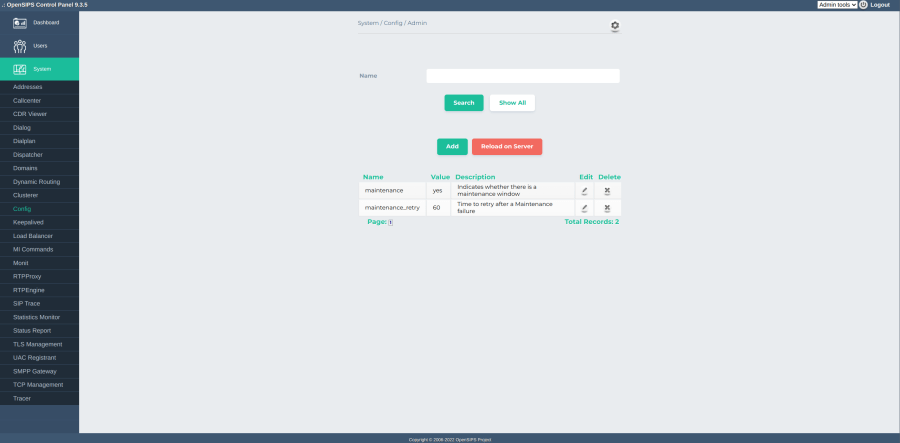
The OpenSIPS Control Panel Config tool maps by default on the database schema specified earlier, displaying for each setting its Name, Value and a short Description about what the setting means:

The tool is highly customizable, allowing you to tune every possible option, such as:
- The name of the table to store the settings (defaults to config)
- The name of each column used
- The SQL Cacher config id to reload when changes need to be pushed
The tool allows you to set arbitrary settings to arbitrary values, which will be later retrieved in the OpenSIPS config and used accordingly. The module also has the ability to reload OpenSIPS’ cache when changes need to be pushed online.
OpenSIPS Config
In order to integrate OpenSIPS configuration file with the settings configured in Web, we need to set up the SQL Cacher module to look at the same database and table that the CP Config tool points at. For example, for the table defined earlier, we should have the following setup in OpenSIPS config:
#### CACHEDB_LOCAL module
loadmodule "cachedb_local.so"
modparam("cachedb_local", "cache_collections", "config=8")

#### SQL_CACHER module
loadmodule "sql_cacher.so"
modparam("sql_cacher", "cache_table", "id=config
db_url=mysql://opensips:opensipsrw@localhost/opensips
cachedb_url=local:///config
table=config
key=name
columns=value
on_demand=1")
Note that you need to tune the db_url setting to point to the same table and database as the CP tool does.
And now you are all set – from now on, it is up to you to use in your script the settings you define.
Example
As mentioned earlier, the settings you define are entirely up to you and can be customized to suit your needs. To illustrate, let’s consider a common scenario where you need to drain an OpenSIPS instance of all active calls for maintenance. Naturally, you don’t want to shut it down abruptly and lose all ongoing calls. Instead, you simply want to stop accepting new ones while allowing existing calls to continue.
To achieve this, we add a new setting, namely maintenance, which has a default value of no (by default we do not want to reject new calls). Let’s first add handling in the configuration file: we need to identify what is the point in the script where initial requests are handled, and if the maintenance value is set to yes, reject the traffic, otherwise allow it. This translates to the following snippet in OpenSIPS:
route {
    …
    if (has_totag()) {
        # process sequential requests
        …
        exit;
    }
    # here we process only initial requests
    if ($sql_cached_value(config:value:maintenance)) {
        if ($sql_cached_value(config:value:maintenance_retry_after))
            append_to_reply("Retry-After: $sql_cached_value(config:value: mainenance_retry_after)\r\n");
        send_reply(503, "Service Unavailable");
        exit;
    }
}
As you may have noticed, in the above snippet we are also attaching a Retry-After header to the reply, in case it had been defined. Note that if the setting is missing in the database, or has a zero-length value, it is evaluated as NULL in OpenSIPS, thus a test will return false for it.
Conclusions
Starting with the OpenSIPS Control Panel 9.3.5 release, you can now fine-tune OpenSIPS’ behavior more easily, flexibly, and efficiently using the new Config tool.

 Drops of wisdom, knowledge and news from OpenSIPS
One thought on “Implementing OpenSIPS realtime Controls via Control Panel 9.3.5”