

The OpenSIPS Control Panel is a powerful tool for managing OpenSIPS through a user-friendly web interface. It provides various features for interacting with OpenSIPS modules, leveraging both database operations and the Management Interface (MI).
But what if you need to provision an arbitrary table used from the OpenSIPS config? This is where the TViewer module comes in handy.
The TViewer module in the OpenSIPS Control Panel enables users to configure and provision custom tables within the OpenSIPS setup. It offers a range of features, including:
- Custom Table Schema Definition – Define the structure of your custom tables based on your needs.
- Flexible Data Provisioning – Use different input formats such as text fields, text areas, dropdown lists, and combo boxes.
- Custom Buttons – Add buttons for operations like reloading data or adding/editing entries.
- Entry Actions – Create custom buttons that trigger specific actions on individual table entries.
- MI Command Integration – Control OpenSIPS directly by executing MI commands.
- Multiple Tabs per Tool – Organize settings into separate tabs within the interface.
With TViewer, managing custom tables in OpenSIPS becomes intuitive and efficient, reducing the need for direct database manipulation.
Creating a new TViewer based module
Setting up a new module in the OpenSIPS Control Panel requires the following steps, as also described in the documentation page:
- Define the Database Table
- Create the necessary database table that the module will interact with.
- Ensure it follows the required schema and is accessible by OpenSIPS.
- Configure the TViewer Module
- Define the custom table schema in the TViewer module configuration.
- Specify field types (text inputs, dropdowns, checkboxes, etc.).
- A comprehensive documentation for defining the table’s structure can be found in the tviewer config samples file.
- Set Up Actions and Buttons
- Configure custom buttons for adding, editing, or deleting entries.
- Define entry actions that trigger specific OpenSIPS commands or scripts.
- Integrate with OpenSIPS MI Commands
- Link the module to MI (Management Interface) commands for real-time control.
- Configure commands for data manipulation and OpenSIPS interactions.
- Enable Multiple Tabs (if needed)
- Organize settings into multiple tabs for better structure and usability.
- Update Control Panel Configuration
- Modify the OpenSIPS Control Panel settings to recognize the new module.
- Ensure proper permissions and user access settings.
- Test and Validate
- Verify that data provisioning works as expected.
- Ensure the interface updates correctly and interacts with OpenSIPS seamlessly.
Ansible
Additionally, new TViewer modules can be effortlessly created using the opensips-cp ansible role. By specifying the tviewer_config setting in the opensips_cp_modules variable and pointing it to the appropriate TViewer configuration file, users can automate the deployment of custom modules. This approach simplifies the setup process, ensures consistency across environments, and eliminates the need for manual configurations.
Examples
The TViewer module is not a new addition—it has been part of the OpenSIPS Control Panel for over 10 years (since 2014) and has been widely used in several existing tools, which you can reference as examples, such as:
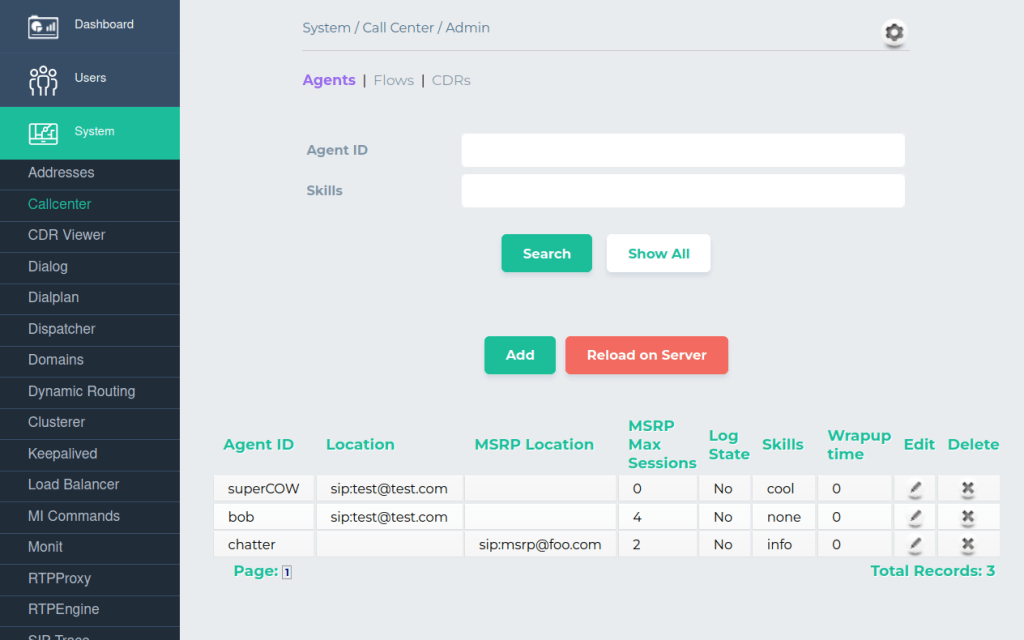
- Call Center, which uses several tabs to define agents, flows and view CDRs
- SMPP, allows you to define proto_smpp destinations
- UAC Registrant, used to configure users that register on behalf of the OpenSIPS server
- TCP and TLS management tools, used to manage different tcp/tls destinations settings
- Config tool, used to tune arbitrary configurations variables in OpenSIPS script.
Conclusions
The OpenSIPS Control Panel TViewer module provides a powerful and flexible solution for simplifying data provisioning and OpenSIPS management. By allowing the easy configuration of custom tables, the module enables efficient management of OpenSIPS resources through an intuitive, user-friendly web interface, reducing complexity and gaining more control over the configuration with minimal effort.
Do you want to learn more about the OpenSIPS ecosystem? Join us in Amsterdam, for the OpenSIPS Summit 2025.

 Drops of wisdom, knowledge and news from OpenSIPS