

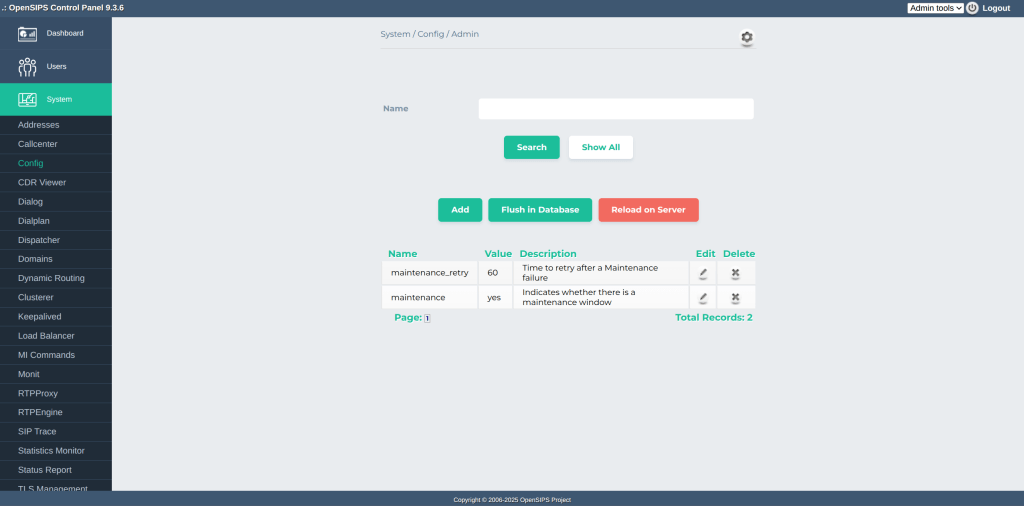
Some time ago, we demonstrated how to dynamically tune OpenSIPS’ runtime configuration using the OpenSIPS Control Panel in combination with the SQL Cacher module. While effective, that approach involved a certain level of configuration overhead to set up and maintain the SQL Cacher infrastructure.
To address this, we’ve taken a significant step forward with the introduction of a dedicated OpenSIPS module: config. This stand-alone module eliminates the need for external caching setups, simplifying deployment and making runtime configuration more intuitive, streamlined, and accessible.
The new config module is designed to simplify runtime configuration management in OpenSIPS by introducing a dedicated $config(...) variable. This variable provides easy and direct access to configuration values from within the OpenSIPS script, significantly reducing scripting complexity.
Storage
At its core, the module uses an internal/local cache as its main storage, which is initially populated from the database during startup. Once loaded, this cache can be dynamically modified through temporary updates —offering great flexibility for real-time tuning.
There are two main ways to perform these updates:
- Via the script – by directly writing to the
$configvariable. - Via the Management Interface (MI) – using the
config_pushorconfig_push_bulkMI commands.
To persist these temporary changes and synchronize them back to the database, the config_flush MI command can be used at any time. This allows for a dynamic yet consistent configuration workflow, where changes can be safely tested or committed as needed.
Restart Persistence
By default, when OpenSIPS is restarted, all temporary configuration changes stored in memory are discarded. On startup, the config module re-initializes its local cache by loading values from the database, effectively resetting any modifications made at runtime (unless, or course, previously flushed).
However, this behavior can be changed by enabling restart persistence via the restart_persistent_memory parameter. When this option is enabled, OpenSIPS will preserve the in-memory cache across restarts by restoring it from the persistent memory, rather than reloading it from the database.
OpenSIPS Control Panel
The OpenSIPS Control Panel remains fully compatible with the new config module—as long as the master version of the Control Panel is being used. While the new module continues to rely on the same database schema outlined in earlier implementations, several important updates have been made to accommodate the new runtime configuration engine.
Notably, the Management Interface (MI) commands have been adapted to interact with the new config module, ensuring seamless communication and control. Additionally, a new “Flush in Database” button has been introduced in the interface – this can also be used to distinguish the new version from the old one.
Migration
Migrating from the legacy sql_cacher setup to the new config module in OpenSIPS 3.6 is straightforward and significantly simplifies your script logic.
- Remove the SQL Cacher preamble
Begin by removing anysql_cachermodule-specific configuration from your OpenSIPS script, including module loading and related parameters. - Load the
configmodule
Instead, load theconfigmodule by adding it to your script’s module list and setting the same database connection previously used bysql_cacher. - Update variable usage
For every instance of$sql_cached_value(...)used in your script, replace it with the corresponding$config(...)access pattern.
And that’s it, you are all set.
Conclusions
Use the new OpenSIPS 3.6 config module to easily manage and update runtime configuration dynamically without service restarts!
For more tips and the latest OpenSIPS news, don’t miss this year’s OpenSIPS Summit in Amsterdam, May 27–30!

 Drops of wisdom, knowledge and news from OpenSIPS