

When comes to the media/RTP side, one of the most common problem to be faced is the so called “one way audio”, or “one party does not hear the other one, but vice-versa does”.
So, lets explore a bit how to troubleshoot such problems. But first, we need to understand how the media/RTP flows are negotiated and set during a SIP call – this will be very relevant in understanding where to look when something does not work.
How the RTP flows are set
Let’s take a look at the typical call flow where caller/UAC calls callee/UAS via a SIP proxy. The UAC has IP A while the UAS has the IP B.
Everything starts with UAC sending the SIP INVITE to callee (via proxy, of course). From media perspective, the UAC will describe in the SDP (attached to the INVITE) where it wants to received the RTP : an IP and port. In our case, the UAC will advertise the IP A and Port X for receiving RTP/media from the other party.
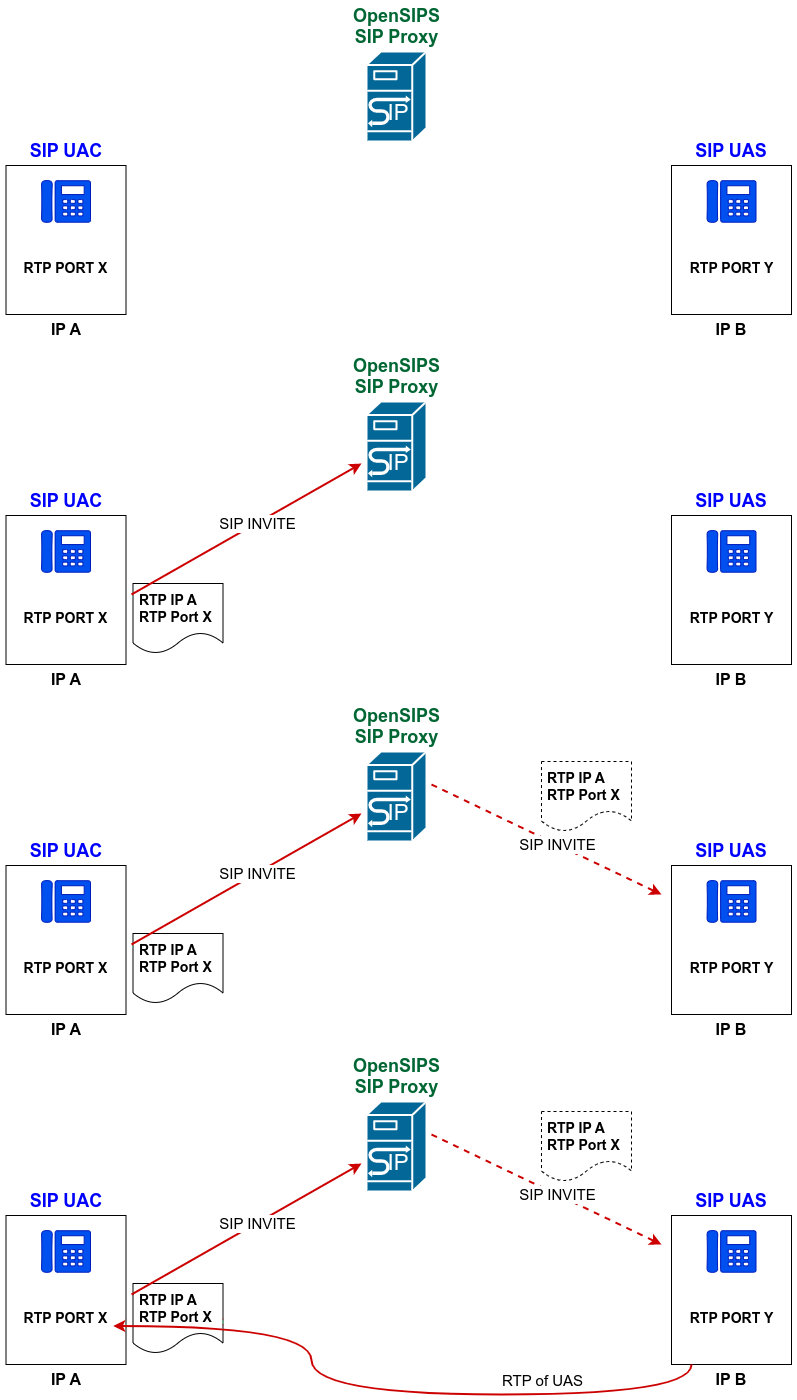
When the SIP INVITE is received by the callee/UAS, the UAS will have in the received SDP the information about where to send its RTP – so the UAS will know it has to send RTP to IP A and Port X (based on the SDP received via the SIP INVITE)
So, the fact that we have RTP flowing from UAS to UAC (red bottom line) is because of the SDP received in the INVITE from UAC.
Now, when the call is answered by the UAS, a 200 OK SIP reply will be generated for the received INVITE. In a similar way, the UAS will describe in the SDP (attached to the 200 OK) where it wants to received the RTP : an IP and port. In our case, the UAS will advertise the IP B and Port Y for receiving RTP/media from the UAC party.
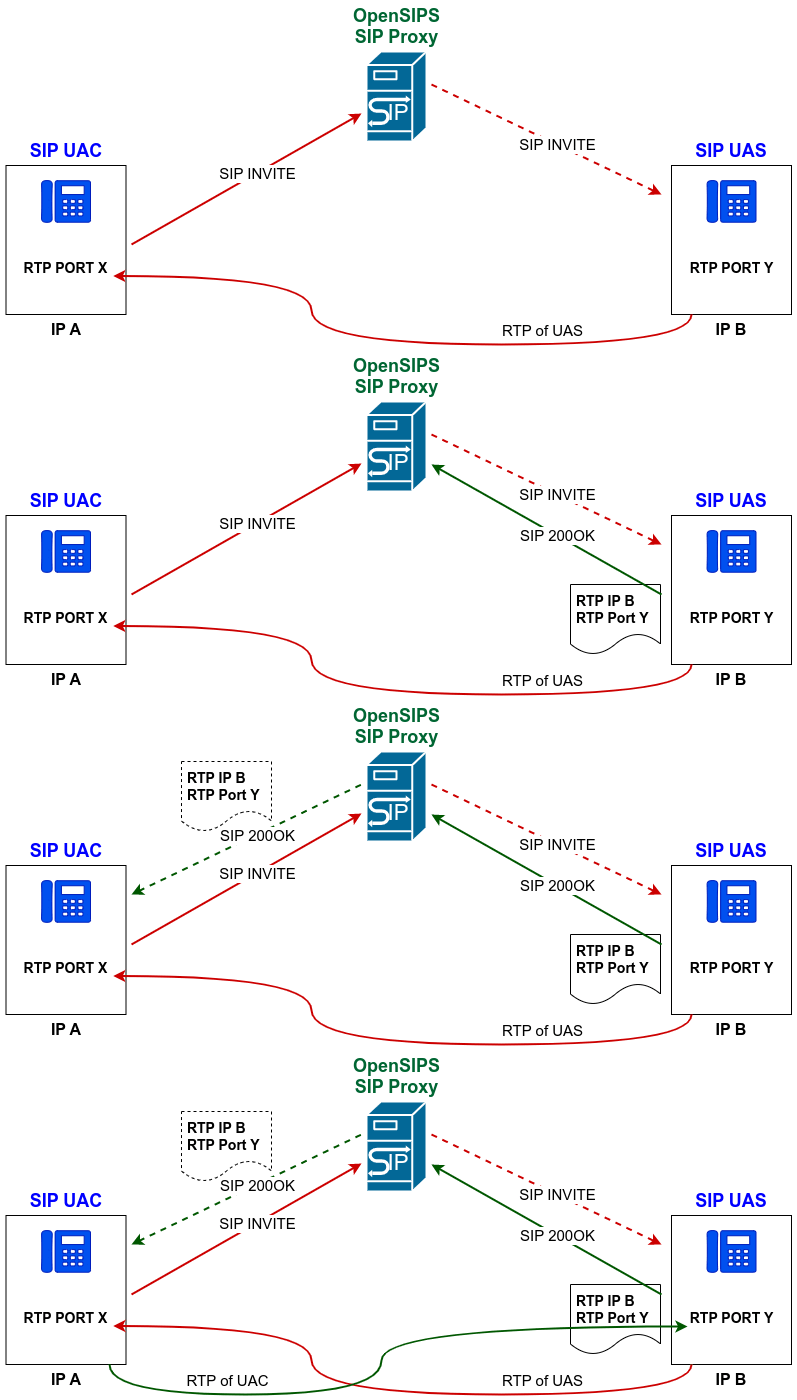
Now, when the 200 OK is received back by the caller/UAC, the UAC will have in the received SDP the information about where to send its RTP – so the UAC will know it has to send RTP to IP B and Port Y (based on the SDP received via the 200 OK)
So, the fact that we have RTP flowing from UAC to UAS (green bottom line) is because of the SDP received in the 200 OK from UAC.
Here is the final picture with the RTP info exchange in both directions and the resulting RTP flows:
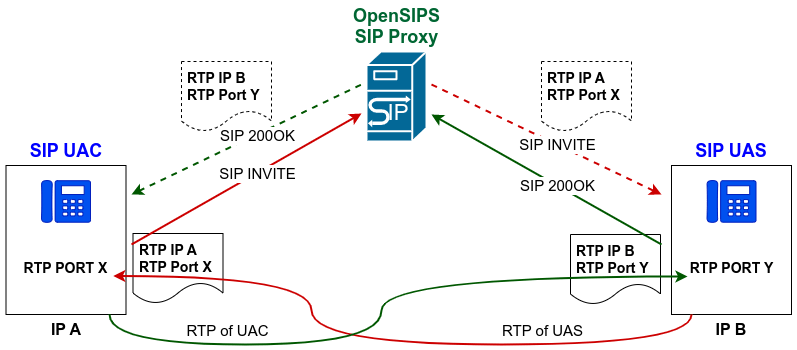
NOTE: In reality, both RTP streams start after the signaling session is fully set, so the RTP will run in both directions after the 200 OK. The separation here is done to provide a clear “cause & effect” relation between the RTP flows and signaling.
Where to look?
Now it is clear where to look if one of the RTP/audio flows is missing:
- if the caller / UAC has no audio, it means there is something wrong with the SDP (RTP info) it sent to the UAS – so we need to check the SDP in the INVITE request.
- if the callee / UAS has no audio, it means there is something wrong with the SDP (RTP info) it sent to the UAC – so we need to check the SDP in the 200 OK reply.
What to check
Let’s assume that the SIP part works ok and no SDP is lost during the call setup. So, let’s focus on the information inside the SDP. From this perspective, a lack of audio means invalid SDP information (IP and port).
So, let’s take a look at the SDP and see how we can spot the RTP IP and port:
......
s=-
c=IN IP4 1.2.3.4
t=0 0
m=audio 31310 RTP/SAVP 8 0 101
a=rtpmap:8 PCMA/8000
a=rtpmap:0 PCMU/8000
.....
The “c” line holds the IP address (1.2.3.4 here), while the “m” line holds the port (31310 here). Note that the an SDP may have multiple “c” and “m” pairs if there are multiple RTP streams (like audio and video).
Why invalid SDP info ?
An invalid SDP info (from the RTP coordinates perspective) means the IP and port advertised in the SDP are wrong. But how something like that may happen?
In most of the case is because of NAT presence – the UAC or UAS are behind a user NAT, so the device will advertise in the SDP a private IP for RTP. And of course, the other party in the call will not be able to send RTP to a private IP behind an NAT.
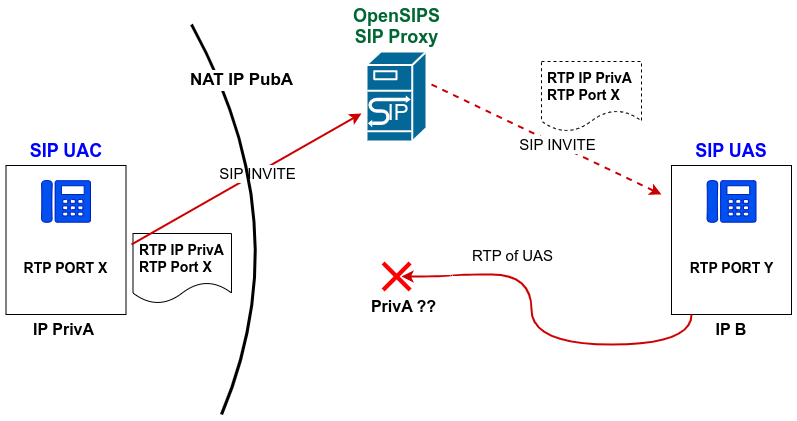
To deal with such case, you need to implement support for NAT traversal, like STUN, TURN or COMEDIA, all typically on the SIP proxy side (to help the end device to traverse its NAT). This is something we teach during the OpenSIPS Bootcamp training.
The NAT presence is the most common cause, nevertheless we should not discard other causes like:
- SIP ALG interference – this is related to the NAT scenario, where the SIP UA sits behind a router doing NAT and SIP ALG (Application Layer Gateway). Normally the SIP ALG should help the UA to traverse the NAT, but in most of the cases (due to its limited understanding over the SIP protocol) it ends up doing chances over the SDP that are not correct. Even if the ALG will change the private IPs in the SDP with the public IP of the NAT/router, it fails in properly replacing the SDP port correctly or maintaining the NAT pinhole open. The best way to deal with this is to actually try to disable the SIP ALG support in the router;
- bad RTP relay insertion – some SIP proxy on the path tried to insert a media relay (like rtproxy on rtprelay) in the media path, but it did in in the wrong way, like maybe not symmetric (on both directions), or the relying sessions was not properly set, etc.
- firewall presence – even if the actual SDP info is correct, sometimes a firewall may prevent a device from receiving the incoming RTP, so this is something worthy to check.
Conclusions
When experiencing a one way audio problem, identify the SDP related to the missing RTP stream, check if the IP and port info are route-able or not. If not (private IPs) , you may have a NAT problem. If yes, check where the SDP IP point to and investigate if that’s a valid hop that may route somehow the traffic to the silent device.

 Drops of wisdom, knowledge and news from OpenSIPS